Design - Telemetry
March 29, 2026
Last updated on August 17, 2026
The prime directive of OneMore is to only add value to OneNote where it makes sense. In my excitement to explore both my own curiosities and the fantastic proposals sent to me from so many great users, OneMore has grown to the point where it's no longer clear whether all of its broad functionality is still valuable to the majority of users. To understand how OneMore is being used, I've always wanted to add in a telemetry mechanism. With the encouragement of one of my most prolific users, this is what I've come up with.
|
Telemetry Data
Each invoked OneMore command is recorded as a simple JSON packet. The shape of this packet is demonstrated by this example:
{
"EventId": "02b29c6f2d3d44a4b93a2ce81a65f6b5",
"Timestamp": "2026-03-27T10:53:36.1054786Z",
"EventName": "InsertInfoBox",
"EventType": "event",
"Version": "6.8.2",
"SessionId": "4c2ee1f9bd65458d9ff42dc330488a20",
"Client": {
"OneVersion": "16.0.19725.20190",
"OneArc": "x64",
"MoreArc": "x64",
"OsMajor": 10,
"OsMinor": 0,
"OsBuild": 26200,
"OsEdition": "Professional",
"OsArc": "x64",
"Culture": "en-US",
"MoreCulture": "en-US"
},
"Data": {
"Message": "",
"Info": ""
}
}
These are key fields in this example:
- EventId is a GUID that uniquely identifies every event, primary key
- Timestamp indicates when the action was captured, allowing the ability to sense proximity to other commands in workflow patterns
- EventName is the name of the command invoked
- EventType is either "event" or "error"
- Version is the current version of OneMore
- SessionId is a GUID that uniquely identifies the current OneNote session - a correlation id. This can be used to detect workflows within a session. Each time OneNote is restarted, a new session id is created to avoid connecting to any specific user.
- Client is a set of environmental information that captures the version and architecture of OneNote and Windows
- Data is primarily used to capture thrown Exception information for unhandled exception in OneMore, otherwise, both Message and Info are currently left empty
This is enough information to capture command invocations, analyze workflow patterns, and common command usage.
AWS Architecture
There are few free and robust solutions for traditional desktop applications. Luckily, AWS offers a free tier that should accommodate the scale of the OneMore audience.
Telemetry Storage
The top half of this diagram is the storage workflow. The bottom half defines the shape of the data and queries to retrieve the data.
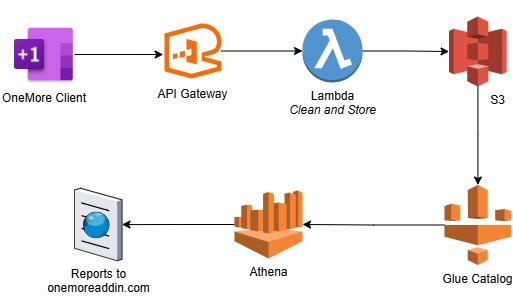
The OneMore client collects the data, serializes it as JSON, and POSTs to an API Gateway endpoint. This is sent on to a lambda where the packet schema and its data are validated and then stored in S3.
The S3 storage model is simply <bucket>\telemetry\<version>\<EventId>.jsonl where <version> is the OneMore version. This is enough to enable partitioning by version if query scalability becomes an issue.
Telemetry Reporting
Glue is used to define the catalog schemas. Aside from the telemetry schema itself, there is also a small lookup table that correlates Windows major.minor.build versions to product names. For example, 10.0.26200 is the first build of Windows 11 25H2.
Athena is used to define a set of queries to extract, slice, or otherwise interrogate the data. For example, a full CSV export query is:
SELECT
t.EventId, t.Timestamp, t.EventName, t.EventType, t.Version, t.SessionId,
t.Client.OneVersion, t.Client.OneArc, t.Client.MoreArc,
t.Client.Culture, t.Client.MoreCulture,
o.ProductName || ' ' || o.VersionString || ' ' || t.Client.OsEdition || ' (' ||
CAST(t.Client.OsMajor AS varchar) || '.' ||
CAST(t.Client.OsMinor AS varchar) || '.' ||
CAST(t.Client.OsBuild AS varchar) || ')' as OS,
t.Data.Message, t.Data.Info
FROM TelemetryEvents t
LEFT JOIN OsLookup o
ON t.Client.OsMajor = o.Major
AND t.Client.OsMinor = o.Minor
AND t.Client.OsBuild BETWEEN o.MinBuild AND o.MaxBuild
ORDER BY Timestamp DESC
This CSV can then be opened in Excel to pivot and analyze as necessary, and then exported for publication on onemoreaddin.com.
|
|
#omwiki #omdeveloper #omdesign
© 2026 Steven M Cohn. All rights reserved. Please consider a sponsorship or one-time donation to support ongoing development |
Created with OneNote.